

Aurora Architecture: Building a Real-Time Analytics Platform
System Overview
Section titled “System Overview”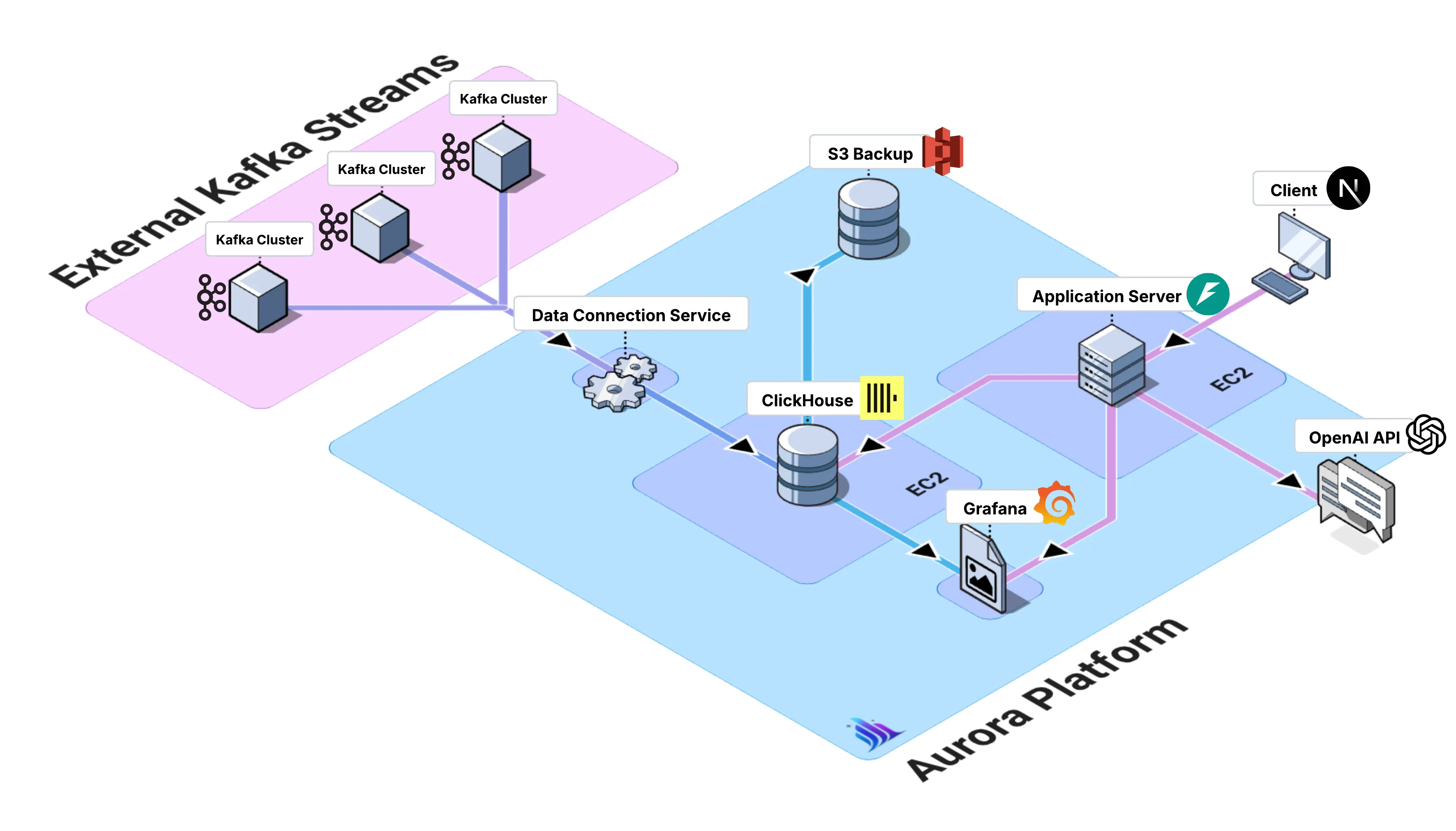
Aurora is designed as a modular, cloud-deployed platform that integrates its core components into a cohesive data analytics ecosystem. The architecture follows a layered approach that separates concerns, incorporating standard microservices decomposition strategies (Newman, 2021, pp. 45-67), while maintaining tight integration between components.
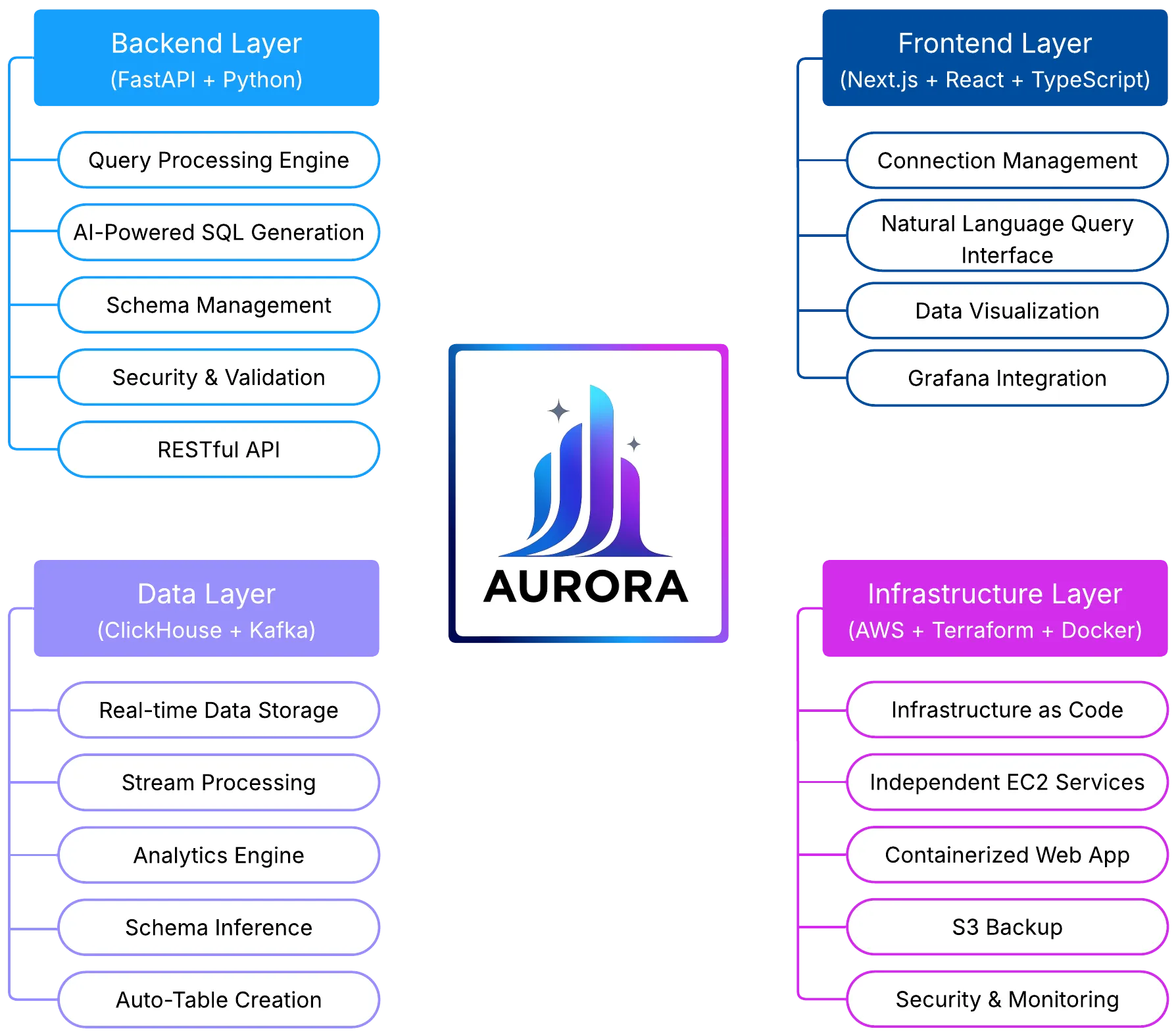
Core Components
Section titled “Core Components”1. Data Pipeline (Kafka → ClickHouse)
Section titled “1. Data Pipeline (Kafka → ClickHouse)”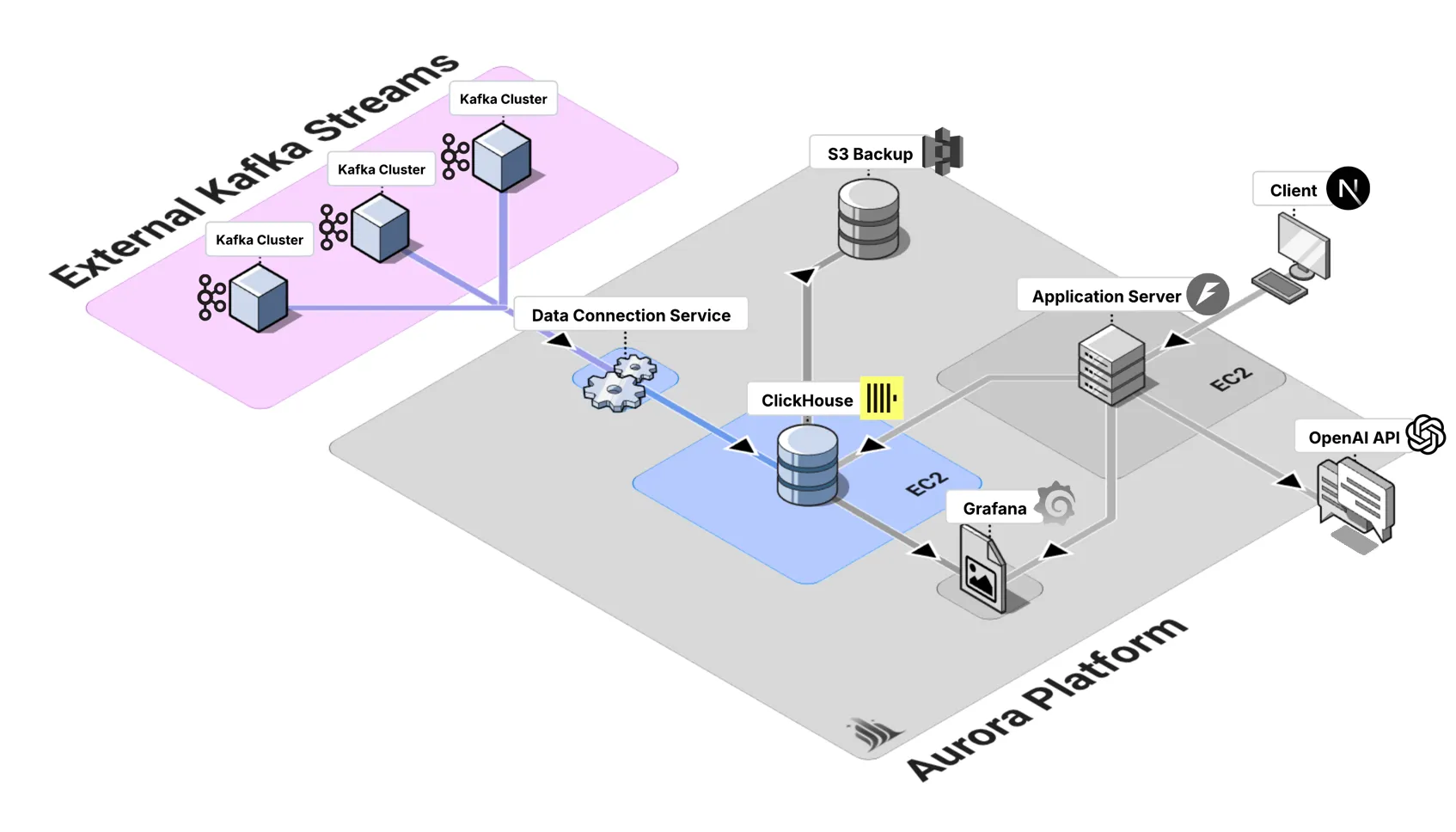
The data pipeline forms the foundation of Aurora’s real-time capabilities, following established patterns for unified stream and batch processing architectures (Carbone et al., 2015, p. 30). It is designed with a modular architecture, which allows teams to connect and disconnect data sources independently without disrupting the broader system. This flexibility makes it easier to manage diverse data flows while maintaining resilience and scalability.
At the ingestion layer, the Kafka Consumer Service handles real-time data streams from Kafka topics. This service is implemented in Python and deployed on EC2 instances. It supports SASL/SSL authentication to ensure secure connections, and includes robust error handling with automatic service restart capabilities. The service also supports configurable batch processing, giving teams control over performance and throughput optimization.
For storage and analytical processing, Aurora leverages ClickHouse, a high-performance columnar database that implements optimized storage and query execution techniques for analytical workloads (Abadi et al., 2013, pp. 220-245). ClickHouse enables high-performance data insertion with optimized timestamp-based partitioning to improve query efficiency. Its SQL interface, extended with ClickHouse-specific features, provides flexibility for analytics, while built-in compression ensures storage efficiency. These optimizations allow Aurora to run real-time analytical workloads at scale with minimal latency.
To simplify management, Aurora provides automated pipeline lifecycle tools. Connect scripts streamline the process of setting up new data pipelines, while disconnect scripts ensure clean removal without risking data loss. Complementing these tools is a monitoring layer that gives teams real-time visibility into pipeline health and performance, ensuring that issues can be quickly identified and resolved.
2. Natural Language Query Engine
Section titled “2. Natural Language Query Engine”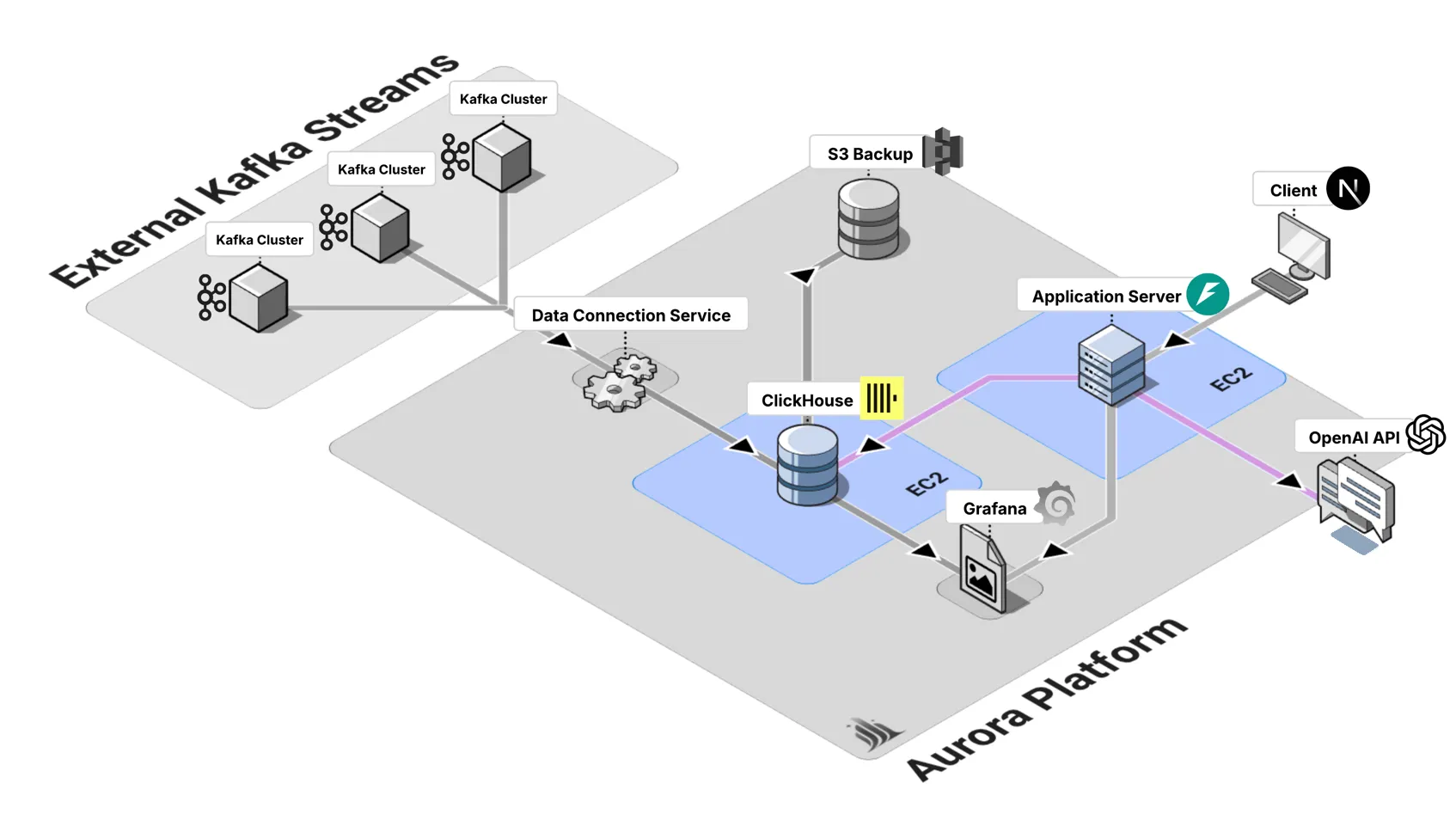
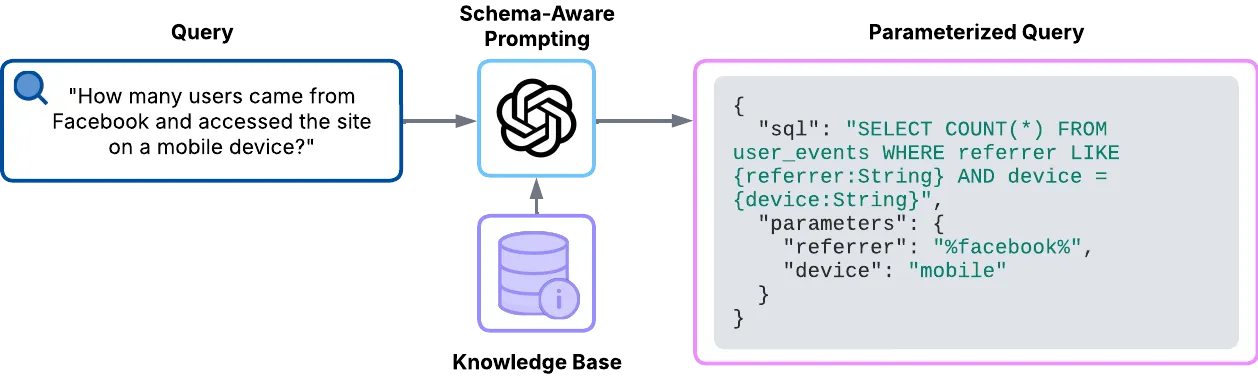
The query engine transforms natural language into executable SQL, making data accessible to non-technical users.
LLM Integration relies on GPT-3.5-turbo for SQL generation. It uses schema-aware prompting with table and column information to guide the model, producing a structured JSON output that includes both SQL and parameter extraction. To ensure security, queries are parameterized to prevent SQL injection.
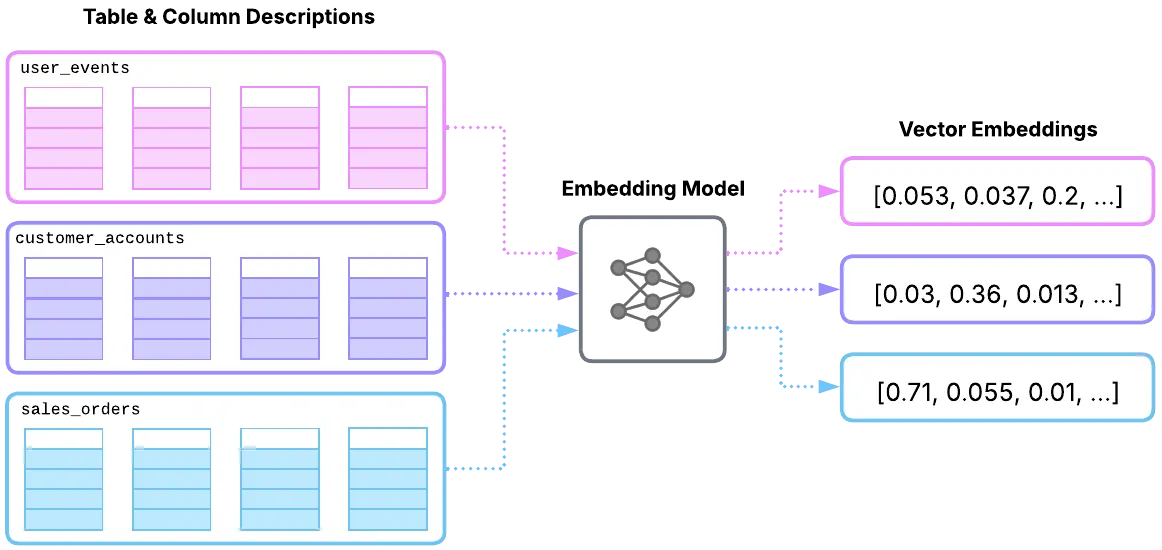
Schema Embedding System is designed to enable semantic search through table and column descriptions. It works by creating vector embeddings of table and column descriptions, which makes intelligent context retrieval possible during query generation. This approach improves accuracy while also supporting fast similarity search, ensuring that only the most relevant schema elements are considered.
Finally, the Context Builder enhances the process by formatting the most relevant tables and columns identified by the schema embedding system. It ensures that only the necessary schema information is included, keeping the context focused and optimized. This not only improves accuracy but also limits the size of the context for faster LLM processing.
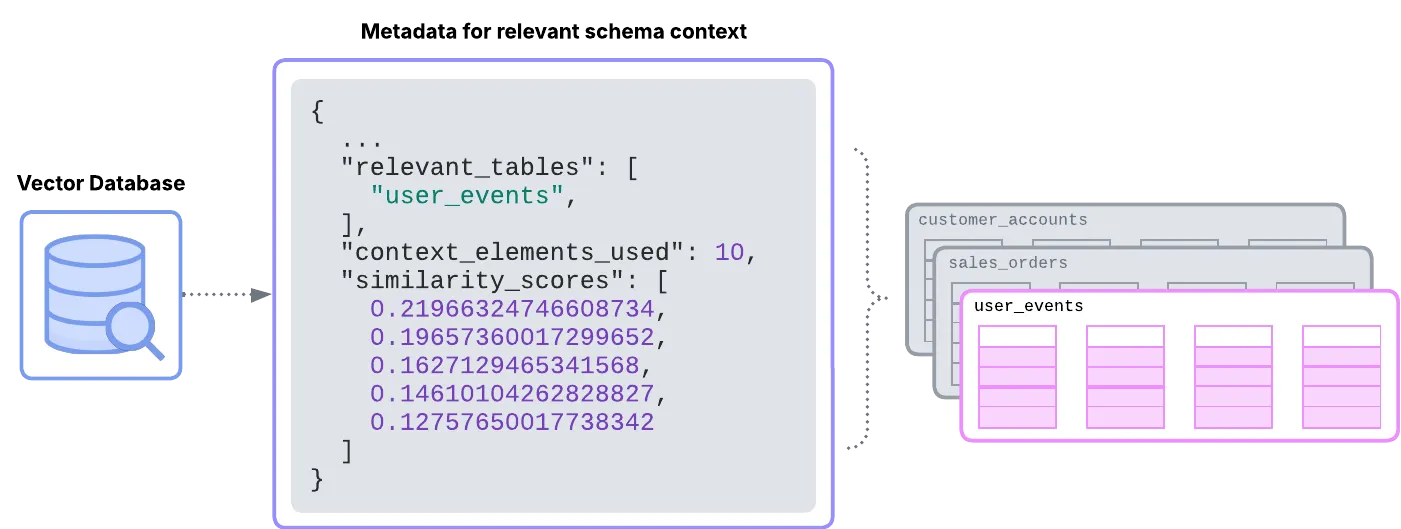
The Query Processing Pipeline thus follows a clear flow:
Natural Language Query → Schema Context Retrieval → SQL Generation → Parameterized Query Validation → Execution → Results.
3. Web Application Interface
Section titled “3. Web Application Interface”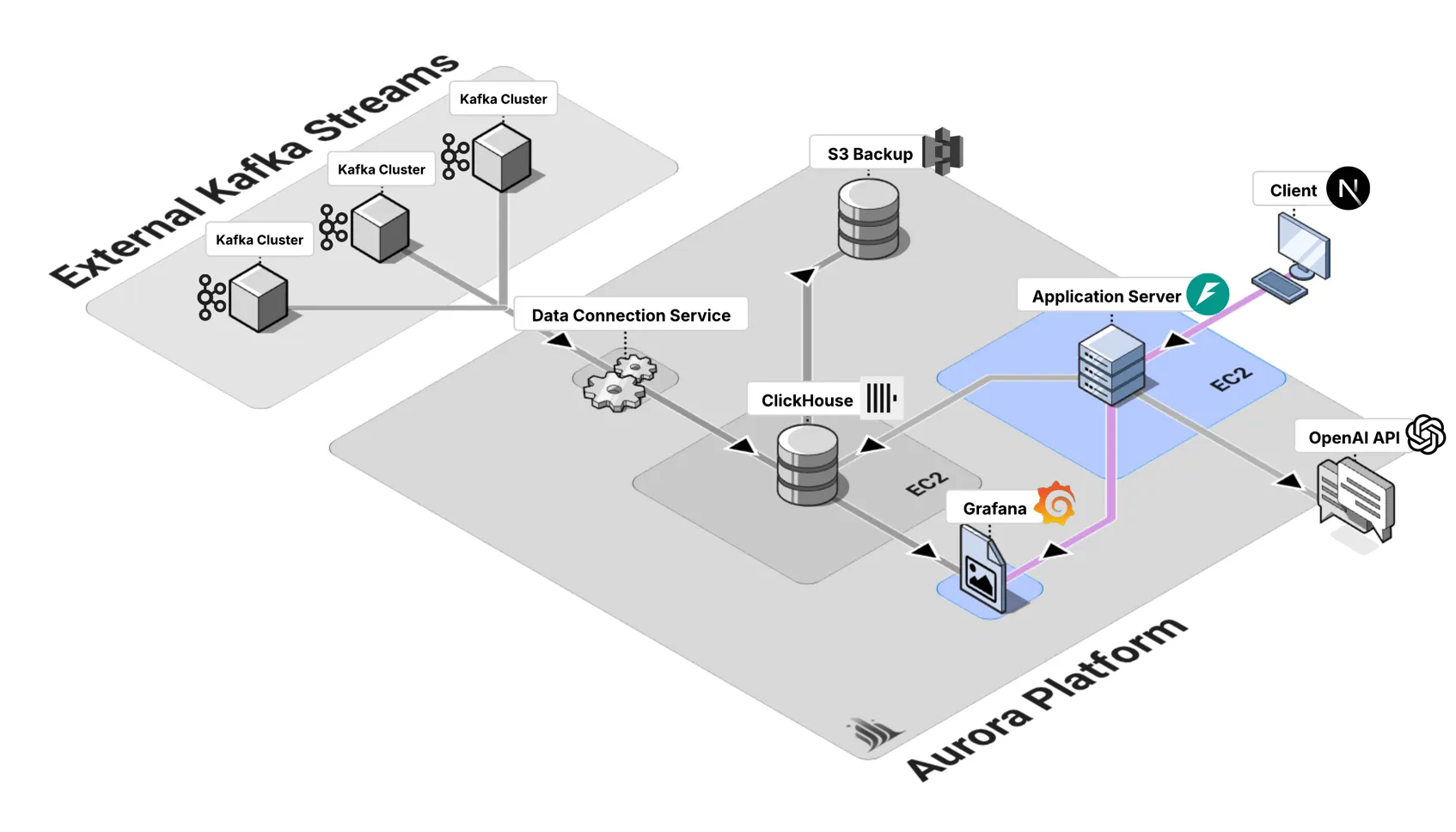
The web interface provides a unified experience for managing data pipelines, executing queries, and visualizing results.
The frontend architecture is built with Next.js, React, and TypeScript, leveraging Tailwind CSS with a custom design system for styling. State is managed using React hooks, ensuring simplicity and performance in handling local interactions. The design follows a mobile-first approach with progressive enhancement, ensuring accessibility and responsiveness across devices.
The application includes three key pages.
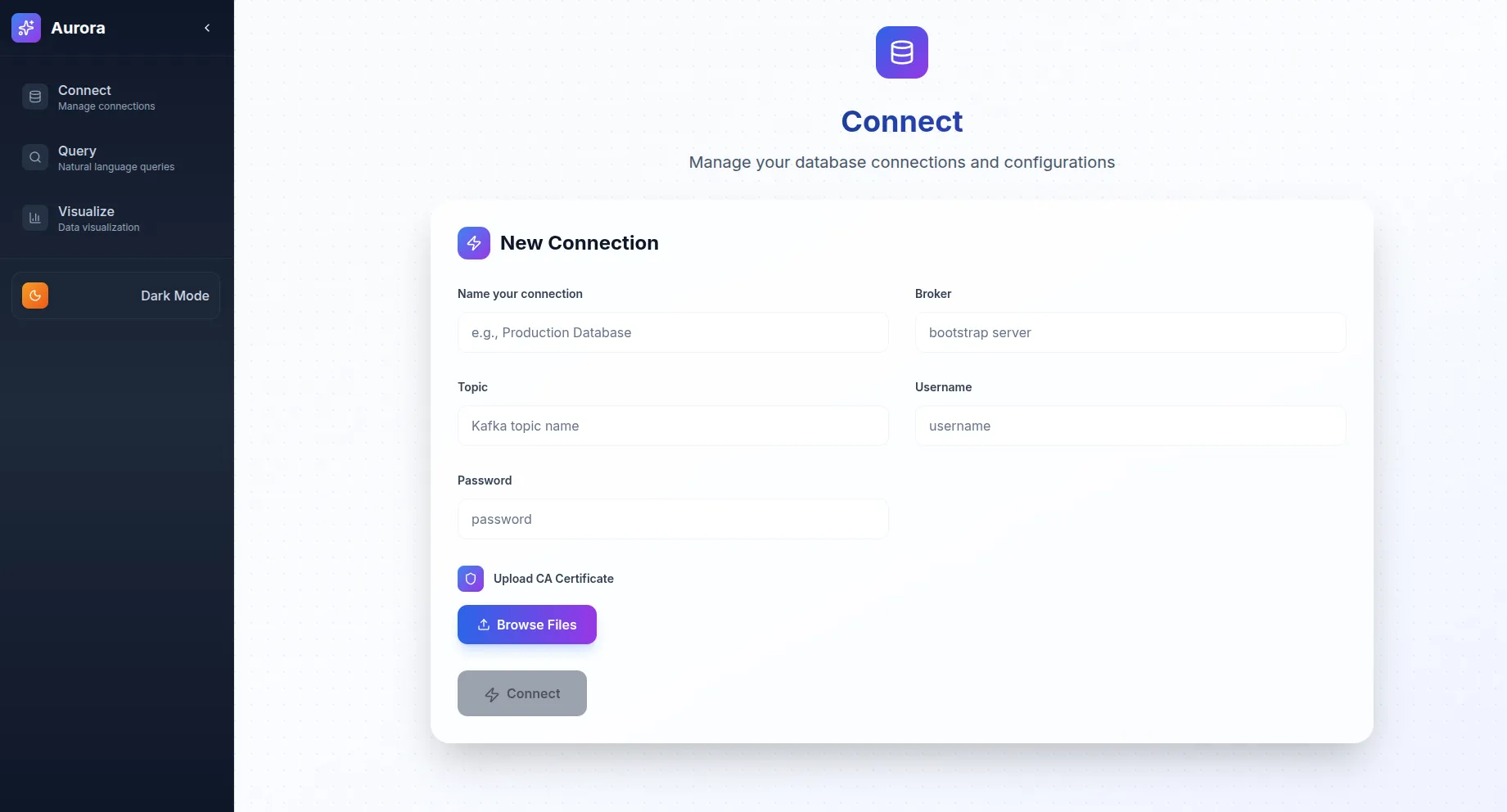
The Connect page provides tools for pipeline management and configuration, allowing users to establish and control data workflows.
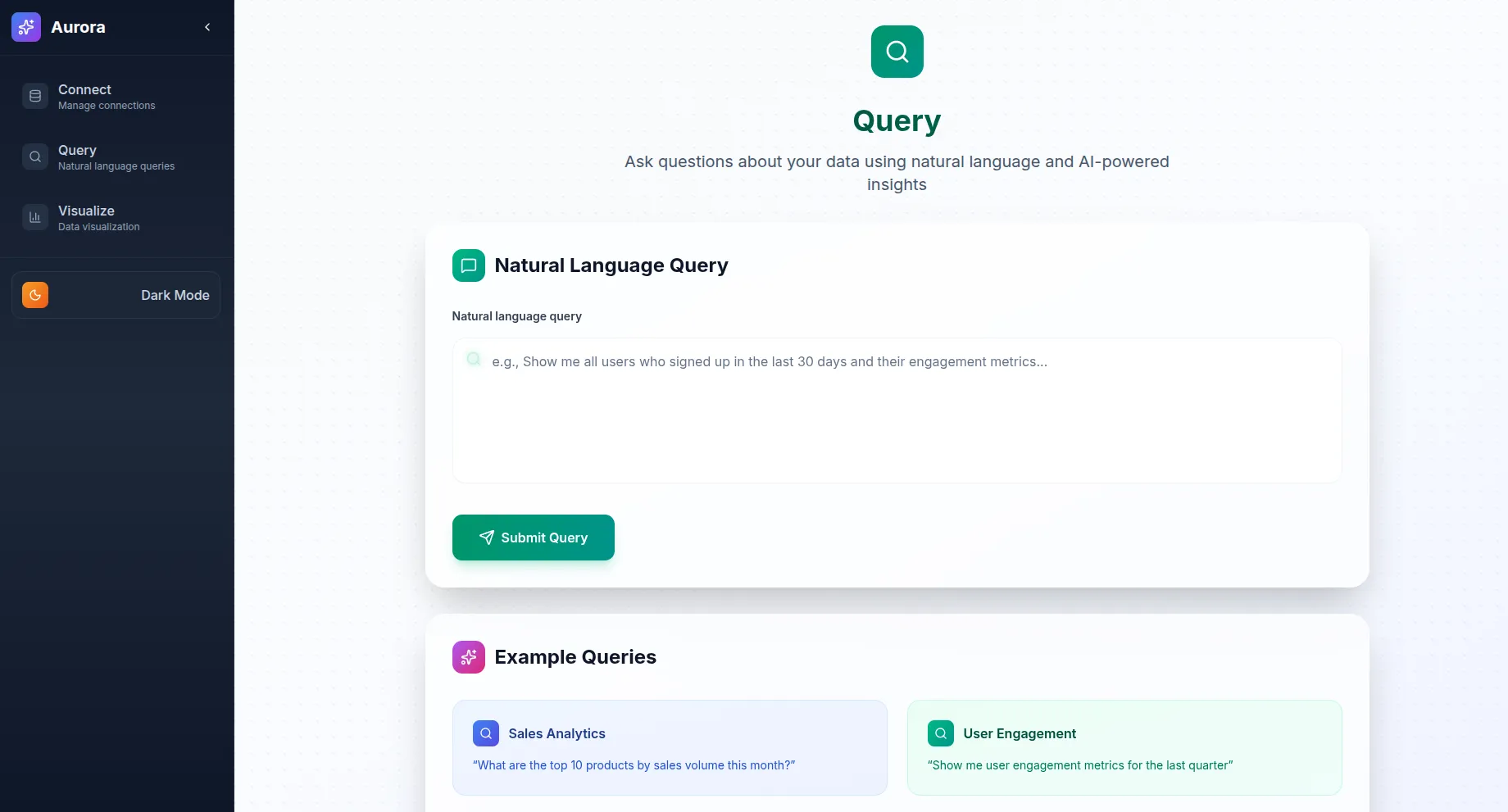
The Query page enables natural language interactions, simplifying the process of writing and executing queries.
The Visualize page integrates Aurora with Grafana, offering powerful visualization capabilities for exploring data.
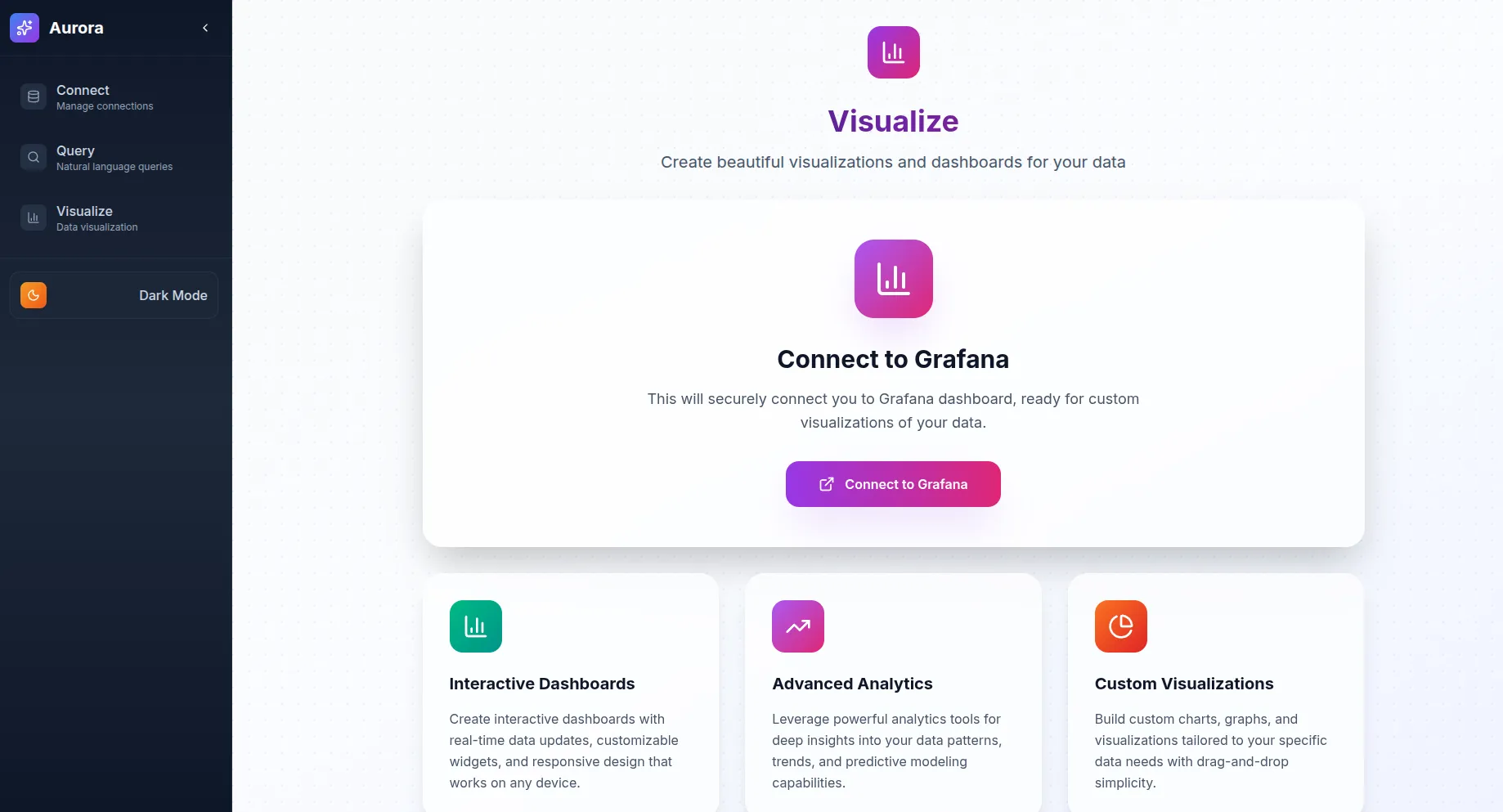
Aurora’s component design emphasizes consistency and reusability. A structured layout system ensures coherent navigation throughout the interface. Form components use consistent styling and basic validation, streamlining user input while maintaining reliability. Status indicators provide visibility into pipeline and connection health, while robust error handling ensures that users receive clear, actionable feedback and recovery options when issues arise.
Deployment Architecture
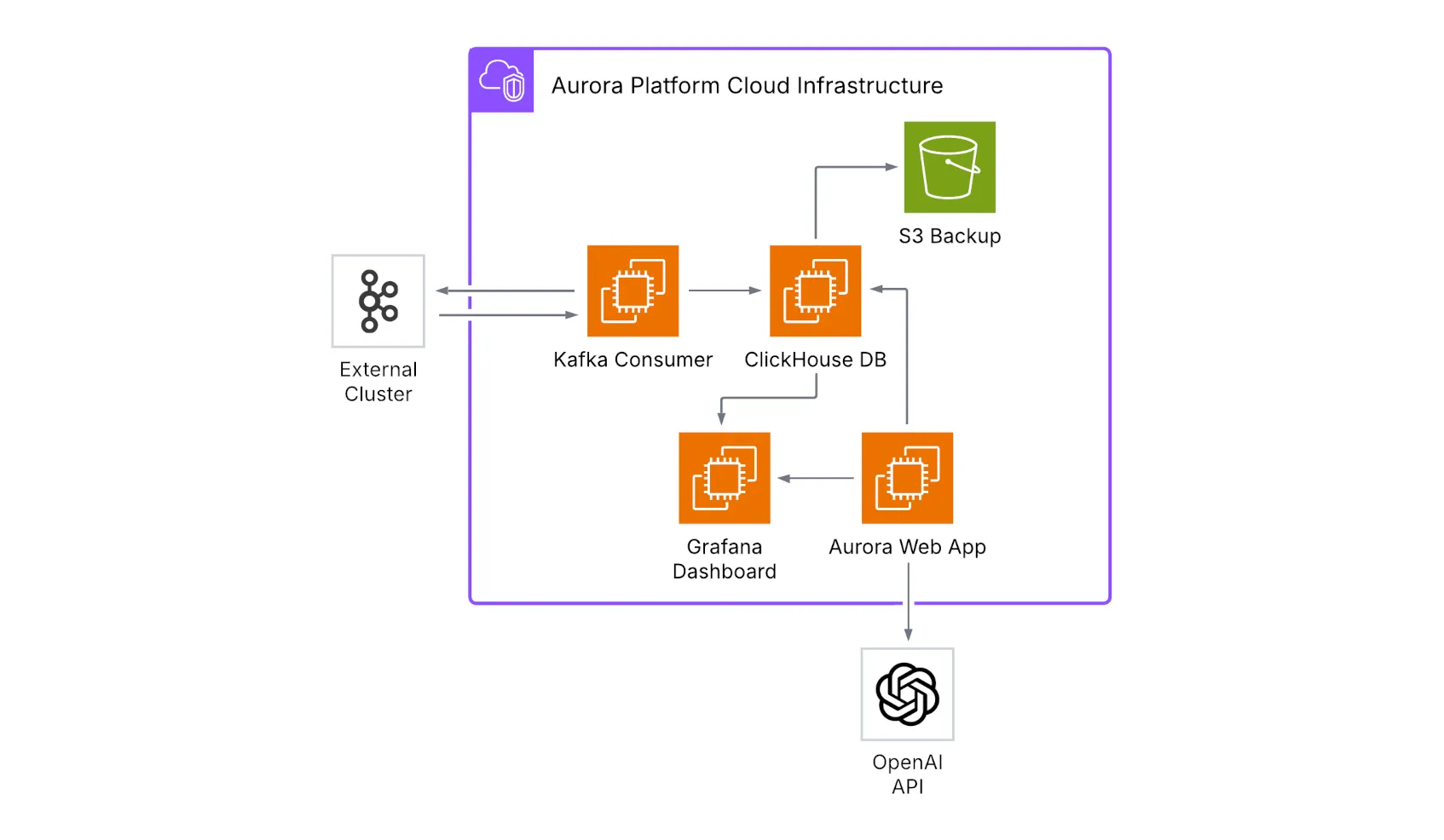
Section titled “Deployment Architecture”Aurora’s deployment architecture is built on a set of key infrastructure components. It relies on EC2 instances to provide compute resources for each service, with dedicated instances for ClickHouse database, Kafka consumer, Grafana dashboard, and the Aurora web application. Persistent data is maintained through EBS volumes and S3 storage for automated backups, while networking is structured with VPC, subnets, and security groups to provide a secure and isolated environment.
For deployment strategy, Aurora adopts Infrastructure as Code principles using Terraform to ensure consistent, repeatable deployments following modern cloud infrastructure management practices (Morris, 2016, pp. 89-108). Automated provisioning handles the complete infrastructure setup, including security group configuration, IAM roles, and service dependencies. Configuration management is achieved through AWS Systems Manager Parameter Store, ensuring secure storage and retrieval of sensitive configuration data. Comprehensive logging provides operational visibility into all system components, enabling effective monitoring and troubleshooting.
This architecture gives Aurora the ability to support real-time data streaming use cases with predictable performance, aligning with the benchmarks established for distributed stream processing systems (Karimov et al., 2018, pp. 1510-1515). Its modular design separates concerns across different components, while the cloud-native foundation ensures efficient resource utilization and operational visibility in production environments. The platform’s open-source compatibility allows for easy integration with existing Kafka-based data pipelines and analytical workflows.
Security Architecture
Section titled “Security Architecture”1. Network Security
Section titled “1. Network Security”Aurora ensures strong network security through multiple layers of protection, following established defense-in-depth methodologies (Anderson, 2020, pp. 156-182). With the reasonable exceptions of the public interface components, all data processing takes place within private subnets, providing strict VPC isolation and preventing unintended exposure to the public internet. Communication between system components is tightly controlled using security groups, which are configured to allow only the minimal required access. To further reduce the attack surface, traditional SSH access has been entirely removed in favor of AWS Systems Manager Session Manager, which provides secure, auditable, and controlled administrative access. Kafka communication is encrypted using TLS, while internal database communication uses ClickHouse’s native protocol within the secure VPC environment, ensuring data confidentiality and integrity during transmission.
2. Data Security
Section titled “2. Data Security”Data security in Aurora is built around authentication and encryption mechanisms. Kafka connections are protected with SASL/SSL, ensuring secure authentication between clients and brokers. Database access uses ClickHouse’s default user configuration within the secure VPC environment. Data is encrypted both at rest (S3 backups with AES256) and in transit for Kafka communications, safeguarding sensitive information against unauthorized disclosure. Application-level logging is implemented to track data processing events, providing visibility into system operations.
3. Application Security
Section titled “3. Application Security”Aurora incorporates multiple application-level defenses to ensure resilience against common attack vectors. All user inputs undergo strict validation to prevent malicious data from entering the system. SQL injection risks are mitigated through the use of parameterized queries combined with input validation. Error handling is designed to be secure, with messages that provide operational insight without exposing sensitive system details or implementation information.
Technical Architecture Decisions
Section titled “Technical Architecture Decisions”1. Modular Design Philosophy
Section titled “1. Modular Design Philosophy”Aurora follows a modular architecture that allows teams to scale components incrementally and independently. While the entire infrastructure is initially deployed at once, it is built around independent components, allowing each major feature to be managed separately. These components interact through clear interfaces, with well-defined APIs ensuring smooth integration. To enable reliable interactions, Aurora relies on standardized communication using REST APIs and message queues for inter-service communication. Additionally, configuration management supports environment-specific settings without requiring code changes, making the system flexible and adaptable.
2. Cloud-Native Infrastructure
Section titled “2. Cloud-Native Infrastructure”The platform is built for cloud deployment with modern DevOps practices. It uses Infrastructure as Code, with Terraform enabling reproducible deployments across environments. Scalable Infrastructure is achieved through the use of EC2 instances, supporting manual scaling by changing instance types or automatic scaling with Auto Scaling Groups for components such as the Kafka consumer, based on message queue depth. To enhance reliability and security, the platform deployment makes extensive use of managed services provided by AWS. A security-first approach is embedded throughout Aurora, with IAM roles, security groups, and encryption applied by default.
3. Data Flow Architecture
Section titled “3. Data Flow Architecture”Data flows through the system in a carefully orchestrated manner:
a. Ingestion Flow:
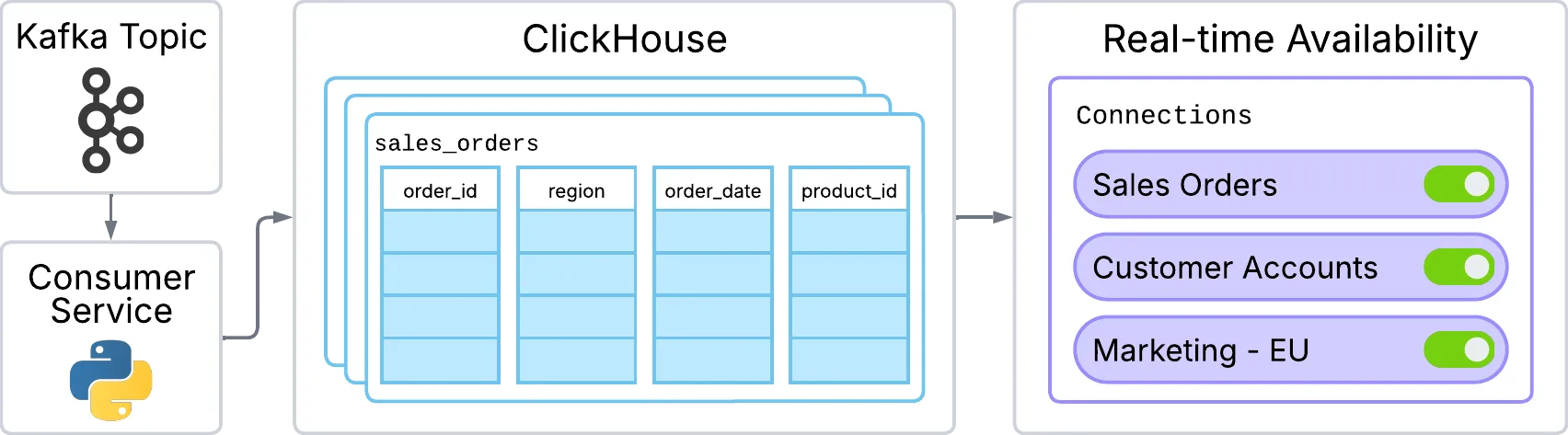
Kafka Topic → Consumer Service → ClickHouse → Real-time Availabilityb. Query Flow:
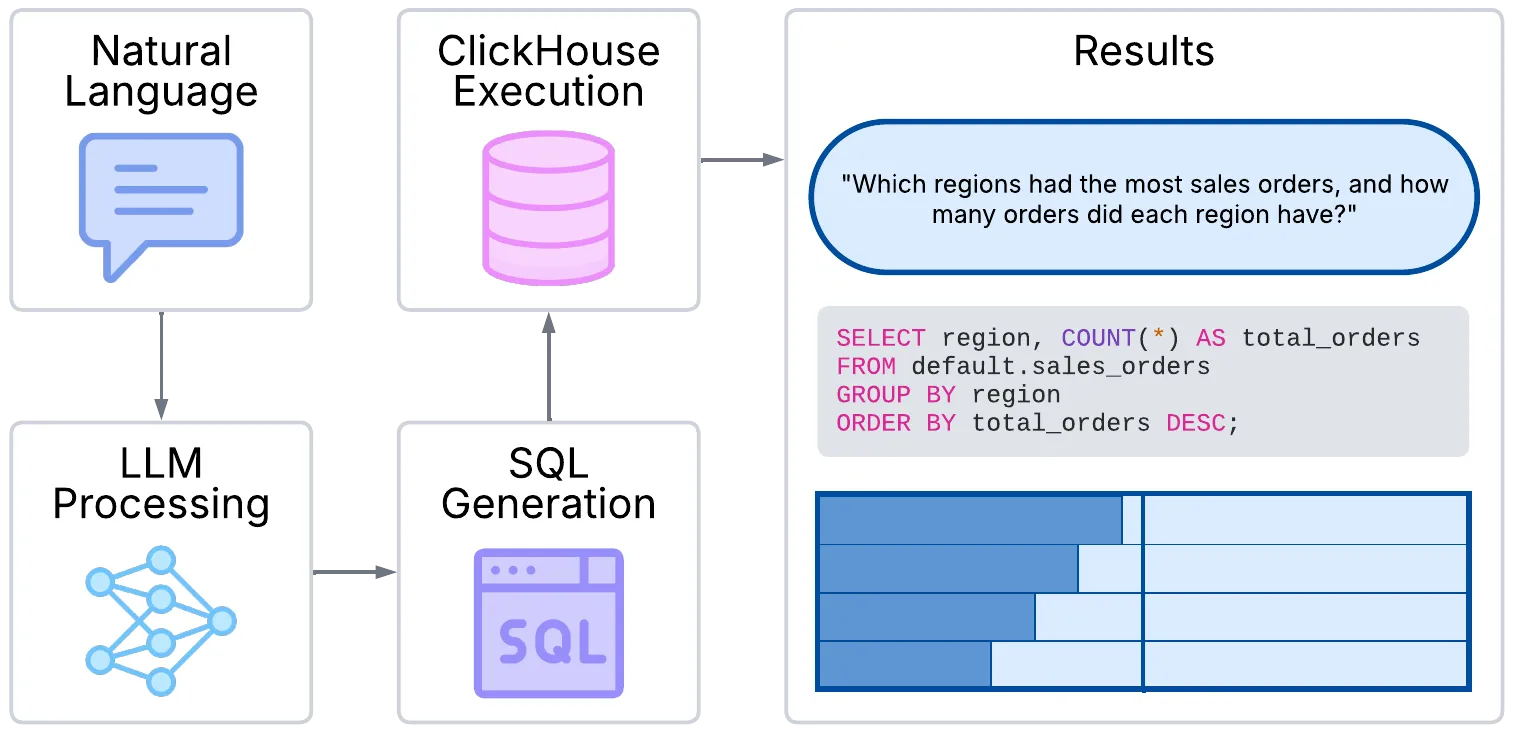
Natural Language → LLM Processing → SQL Generation → ClickHouse Execution → Resultsc. Visualization Flow:

ClickHouse Data → Grafana Integration → Interactive Dashboards → User InsightsPerformance Considerations
Section titled “Performance Considerations”1. Query Performance
Section titled “1. Query Performance”Aurora is designed to deliver high query performance through smart context management and semantic caching, building upon established principles of semantic query optimization (Dar et al., 1996, pp. 334-337). The system leverages focused schema contexts to limit irrelevant data processed by the LLM, improving response times.
Previously generated embeddings are cached using an in-memory dictionary with persistent disk storage, reducing redundant computation for similar queries. The system maintains a mapping between schema element descriptions and their vector embeddings, enabling instant retrieval without re-computing expensive transformer model inference when processing repeated database schema elements.
The application uses semantic search to identify only the most relevant database elements for each query, optimizing LLM interactions and reducing processing overhead. Aurora incorporates ClickHouse-specific syntax and type annotations in generated queries, using ClickHouse’s native parameter format and data types to ensure compatibility with the database engine.
2. Scalability
Section titled “2. Scalability”Aurora is designed with scalability in mind through modular architecture. The system can be manually scaled by adjusting instance types to handle increased workloads. Resource utilization is optimized through efficient data processing patterns, and operational visibility is provided through comprehensive logging. The platform supports vertical scaling through infrastructure modifications to handle increased data volumes. Horizontal scaling can be enabled using standard Terraform modifications before deployment.
3. Reliability
Section titled “3. Reliability”Reliability in Aurora is maintained through data backup strategies and comprehensive logging. The platform includes automated daily backups to S3, safeguarding against data loss and ensuring long-term persistence. Operational visibility is provided through detailed logging of key system activities, enabling troubleshooting and maintenance. The system is designed for predictable performance with manual recovery procedures for maintenance and updates.
